Sunday, October 2, 2016

Need JobList data element info for Supplier Import Submission WebService

Need JobList data element info for Supplier Import Submission WebService          

Problem Desc

Under procurement cloud R11 , customer is using FBDI , "loadAndImportData" operation to upload CSV file of import Suppliers to ERP cloud .

WSDL: https://edpe-test.fin.us2.oraclecloud.com/publicFinancialCommonErpIntegration/ErpIntegrationService?WSDL

Operation : loadAndImportData

<oer:parameter name="jobList" description="List of elements, each containing the details of the ESS job to be submitted to import and process the uploaded file. The details include the job definition name, job package name, and list of parameters."/>

Not able to find required jobList payload details for "import Suppliers "
The Attached document shows the information for Journal Import. Customer is looking for similar info for Supplier Import. Please advise.         


Solution
Looks like customer expects the package name, job names and parameter list for supplier import. Here are the details, let is know if you need anything else:

Package Name: /oracle/apps/ess/prc/poz/supplierImport

Job Names:
ImportSuppliers
ImportSupplierAddresses
ImportSupplierContacts
ImportSupplierBusinessClassifications
ImportSupplierProductsandServicesCategory
ImportSupplierSites
ImportSupplierSiteAssignments

so in the service, this shall be used to import addresses: <ns2:JobName>/oracle/apps/ess/prc/poz/supplierImport,ImportSupplierAddresses</ns2:JobName>

For the parameter list, use - first option as New, All, Rejected and for second option use Y or N.
example: <ns2:ParameterList>NEW,Y</ns2:ParameterList>


Operation: loadAndImportData

The loadAndImportData operation uploads a file to the UCM server based on the document specified and submits an ESS job to load and import the uploaded files to an application table.
The following table lists the parameters for this operation:
Parameter
Name
Description
Parameter
(In/Out)
Mandatory
Type
Document
List of elements, each containing the details of the file to be uploaded. The details include the file content, file name, content type, file title, author, security group, and account.

Document Attributes:
       Content: File content uploaded on to the UCM server. The value of the content tag is obtained by converting the file content into Base64 encoding.
       FileName: Name of the file on the UCM server.
       ContentType: Type of the content file format uploaded, such as.zip, .txt, or .csv.
       DocumentTitle: Title of the file on the UCM server.
       DocumentAuthor: Author of the document.
       DocumentSecurityGroup: A fixed value used to import or export documents on the UCM server. The security group for all the import processes is FAFusionImportExport.
       DocumentAccount: Account under which the file is uploaded..
IN
Yes
java.lang.String
Joblist
List of elements containing the details of the ESS job used to import and process the uploaded file. The details include the job definition name, job package name, and list of parameters.
IN
Yes
java.lang.String
Interface Details
The interface identifier of the specific product interface table to which data is loaded.
IN
No
java.lang.String
Notification Code
A two-digit number that determines how and when a notification is passed for the status of the import job. See the table below for the notification code values.
IN
No
java.lang.String
Callback URL
The callback URL of the specific web service implemented by a customer to receive the ESS job status upon job completion.
IN
No
java.lang.String
Response Code
The response code that returns the request identifier for the first import job in the joblist.
OUT

java.lang.Long


Note
If the file upload to the UCM server has failed, then the rest of the ESS jobs are not executed and the response code will return as 0.

The notification code key information is outlined in the table below:
Digit Position
Digit Value
Meaning
First digit
1
E-mail notification
2
Bell notification
Second digit
0
Send in any case (import failed or succeeded)
1
Send on import success
2
Send on import failure

The following sample payload illustrates the Journal Import process:

<soap:Envelope xmlns:soap="http://schemas.xmlsoap.org/soap/envelope/">
     <soap:Body>
          <ns1:loadAndImportData xmlns:ns1="http://xmlns.oracle.com/apps/financials/commonModules/shared/model/erpIntegrationService/types/">
               <ns1:document xmlns:ns2="http://xmlns.oracle.com/apps/financials/commonModules/shared/model/erpIntegrationService/">
                    <ns2:Content>UEsDBBQAAAAIAHSsJUWkOHOwFAEAAHgDAAAXAAAAQXBJbnZvaWNlc0ludGVyZmFjZS5jc3bV0U9LwzAYBvC74HcIO3h61+XN/xzrqlLRItYJHivmUOzKbFJEP73p1sEQymDgwef0HB5I8gtKREop5Nc35LL3deu8J6u2DrC8S/P7EnAcKGtpwoBRFAtkC6ohOB9cG1y36WrvyGvVvpMLErreB1BMCo1gmNWaw6rM4AOgfEqLLH3MAKSao+TGSgVp8QL5eu3e6io4iNmfwHHsVA/9oE4EId6TMso0p3OEZGp3Qq6K7PxsK8HtEao4QC4Hsd1D6J5qU/UNCRHJdb5xX5HIcKRguBZsR1QdEnE1Z8oKI6aIRosTiFCgjD/A/ohI8CNEcSDVb6LZYPRcu4Y8JGRZ+U/XNEBuu2Q2SGkuo5SRUmylvv+91A9QSwMEFAAAAAgAM4YNRYXONvBWAAAAxQEAABsAAABBcEludm9pY2VMaW5lc0ludGVyZmFjZS5jc3YzNDU0NDAw0DHU8Qxx9dUxs7Q00DPSAYJCHWRgqKNjZGBoom9sqG9grkNT4OrnwstlCHKWsSXMWYbGpiBHAkEiilqjgXCWiTHMWaZmMGdVoag1prOzAFBLAQIUABQAAAAIAHSsJUWkOHOwFAEAAHgDAAAXAAAAAAAAAAEAIAAAAAAAAABBcEludm9pY2VzSW50ZXJmYWNlLmNzdlBLAQIUABQAAAAIADOGDUWFzjbwVgAAAMUBAAAbAAAAAAAAAAEAIAAAAEkBAABBcEludm9pY2VMaW5lc0ludGVyZmFjZS5jc3ZQSwUGAAAAAAIAAgCOAAAA2AEAAAAA</ns2:Content>
                    <ns2:FileName>TestUploadFileName.zip</ns2:FileName>
                    <ns2:ContentType>zip</ns2:ContentType>
                    <ns2:DocumentTitle>LoadandImportCallbacktest</ns2:DocumentTitle>
                    <ns2:DocumentAuthor>finuser1</ns2:DocumentAuthor>
                    <ns2:DocumentSecurityGroup>FAFusionImportExport</ns2:DocumentSecurityGroup>
                    <ns2:DocumentAccount>fin$/journal$/import$</ns2:DocumentAccount>
                    <ns2:DocumentName></ns2:DocumentName>
                    <ns2:DocumentId></ns2:DocumentId>
            </ns1:document>
               <ns1:jobList xmlns:ns2="http://xmlns.oracle.com/apps/financials/commonModules/shared/model/erpIntegrationService/">
                    <ns2:JobName>/oracle/apps/ess/financials/generalLedger/programs/common,JournalImportLauncher</ns2:JobName>
                    <ns2:ParameterList>1061,Expenses,1,ALL,N,N,N</ns2:ParameterList>
                    <ns2:JobRequestId></ns2:JobRequestId>
            </ns1:jobList>
               <ns1:interfaceDetails>1</ns1:interfaceDetails>
               <ns1:notificationCode>10</ns1:notificationCode>
               <ns1:callbackURL>#NULL</ns1:callbackURL>
        </ns1:loadAndImportData>
    </soap:Body>
</soap:Envelope>
Figure 3. Sample payload for the Journal Import process.

Wednesday, September 14, 2016

ACCRUAL RECONCILIATION REPORT FOR RECEIPT ACCOUNTING GENERATING NO OUTPUT

he Accrual Reconciliation Report is not fetching the purchase order details which are already received but not invoiced.


Please ask the customer if they have run the following processes before
submitting the Accrual Reconciliation Report:
1.Create Accounting
2.Match Receipt Accruals

Tuesday, September 13, 2016

Supervisior Hierarchy with No value at the some approval level

We are having customer, need your insight to fulfill his requirement -

Customer using the approved UI when creating approval rules.

He is building a Requisition approval rules based on a Supervisor Hierarchy, and He need to use the "Requester Level 4 Supersior" field in order to match the client's logic.
The issue is that, not all of the future requesters have a Level 4 Supervisor, so the the entire approval structure fails when ever a requester without a level 4 supervisor is trying to submit a requisition, since the system cannot compare "IS IN" or "IS NOT IN" values to NULL.

So the question is: is it possible to use SQL functions (like NVL) within the approval rules in order to prevent an error?
For example: NVL("Requester Level 4 Supersion",1) IS IN ('John', 'Tom', 'Jason').

Could you please help us to capture this requirement.

Answere -
In order to avoid the error, can they add a 'is not blank' condition in the approval rule and re-try the same use case ?

The "is not blank" condition must come before the "equals" condition.

e.g Requisition Amount Equals 80 and Requester Level 4 Supervisor Is not blank and Requester Level 4 Supervisor Equals LastName,FirstName

Thursday, September 8, 2016

How to override the charge of account at requisition to enter it manually

Approve is able to change the charge account however it does not get saved even after clicking save or submit button for Requisition Approval.

Customer is using default charge account rule but only natural account segment they have used the mapping set.

Answer - 

Based on your current set-up, the behavior of the system is

1) Derive a complete charge account (either automatically or from what user has entered depending on the configuration of your charge account rule)
2) Override the Natural Segment of the account derived from step 1.

This means - the Natural Account segment of the charge account entered by the Approver will be overwritten. To prevent this, you need to add the following condition to your mapping set rule (i.e. the segment overlay rule) - "Requisition Charge Account"."Natural Account Segment" Is not.

How it works - 
The above condition is saying - only trigger the rule inside the segment overlay rule(i.e. the mapping set) if there is no manually entered value for the Natural Account Segment. This means if user has manually entered a charge account, the rule will not be triggered and user's entry will not be overwritten.

When a user manually enters a charge account, the source for such manual entry is known as 'Requisition Charge Account'

Case 2 
Hi Team,
Currently customer implementing the production environment and there was a requirement from client to edit "requisition charge account" manually.

I found the solution in below note

(Segment Combination Cannot Be Saved On Purchasing Requisition Line Distribution (Doc ID 2077390.1))

Solution
Before you can apply the solution you are referring to, your setup needs to be the same as the setup for that solution. For that solution, the client had a segment overlay rule. When you have a segment overlay rule, then after TAB derives a complete charge account, it will trigger the segment overlay rule which will then replace a specific segment (Natural Account in this specific instance) in the just derived charge account combination. The client did not want this overlay to happen when a user has manually entered a charge account.

Normally, the solution to the problem would be to add a rule (see steps below) with a condition "Requisition Charge Account".<<SEGMENT_NAME>> Is not null as a first rule but due to a bug, the workaround was to use the condition "Requisition Charge Account"."All" Is not null.

Steps to adding a rule
a) Edit your custom charge account rule (Manage Account Rule > Purchasing > [YOUR_CHARGE_ACCOUNT_RULE]
b) The charge account rule consists of multiple rules (you will see these when you open it up for edit). Add a rule (first rule) with Source = Requisition Charge Account and condition = "Requisition Charge Account"."All" Is not null

Wednesday, September 7, 2016

How to setup TAD when using Fusion Projects

SR 3-11875360031
CENTRAL FLORIDA INVESTMENTS INC

Customer want to setup one accounting rule for both Projects and Non Project related requisitions.

customer has two accounting rules
1. For Purchasing which derives the account based on Item Category
2. For Projects related requisitions

Which works fine for both Independently, but customer is trying to create one Rule which works for both Project and non-project related requisitions

Can you please advise on how to do this setup? Uploading the screen shots showing the current setup they are having on their instance.

Research
======
How can we use Transaction Account Builder(TAB) for project related Requisitions and Purchase Orders? (Doc ID 1955590.1)
PJC: Unable To Access Project Fields On Project-Related Payables Invoice Distribution Line and Can't Setup Transaction Account Builder(TAB) For Projects (Doc ID 1490691.1)
PJC: Create Accounting In Error When Source 'Project Class Code' Value Set In Manage Account Rule (Doc ID 1914752.1)
PJC: How To Navigate Or Find Manage Subledger Applications For Scope Task To Set '‘Project Costing’ Scope (Doc ID 1536294.1)
Transaction Account Builder in Oracle Fusion Procurement (Doc ID 1507175.1)

Answer -
Hi Ramesh,

It looks like you are ONLY overlaying the Account segment for both project and non-project related lines. To combine all the rules, you should do the following

1) Creating a new account rule of type 'Segment'
2) In the Rules section, create the following rules

  • Rule 1 for Project related lines and it will have the following condition -* "Destination
    Type Code"(PO) = EXPENSE 'AND'
    "Expenditure Organization ID" Is not null
    * . The value type for this rule will be Mapping Set and it will point to the Mapping Set you have created for your projects.
  • Rule 2 for non-Projected related lines and this will not have any condition. The value type will also be mapping set and this will point to the Mappping Set you have created for item category

3) In your Transaction Account Defintion, specify the rule from step 2 above as your Account Segment overlay rule

The explanation is this -

a) The system will first derive a complete charge account based on the account combination rule in your TAD

b) Then the system will call the overlay segment rule. The system will check Rule 1 in your overlay rule. It says to check if the line is of type expense and also has an Expenditure Org ID (you get this when you specifiy Project Details for the line). If the conditions are true, it will look at the attached mapping set and will not call Rule 2. If the conditions are false, it will move to Rule 2

Monday, August 22, 2016

Populate cost center segment on PO Charge natural account without Mapping s

We need to know how to populate the cost center segment on PO Charge natural account without creating a mapping set.how can a cost center rule be created to assign Location Code as Cost Center segment on PO Charge Natural account field on requisitions and purchase orders?

We want to accomplish this without a mapping set since cost center segment exactly matches with Location Code. Also since we have many location codes we do not want to maintain the mapping set.

Solution -
We found a possible solution.
We assume when the customer says location they mean Deliver-to Location. That's the only location segment source for TAB.
If they mean for other things, the solution may not work.

First, go to manage accounting flexfield, find the value set for cost center segment. Here let's say it called VS1.
Second, create a new account rule, the rule type is value set and VS1 is the value.
Then, create a rule,value type is source, the value is Deliver-to Location and put a reasonable condition.
Last, If you're using the original TAD, we suggest creating a new one. Put the the account rule in for charge account and cost center.

Friday, August 19, 2016

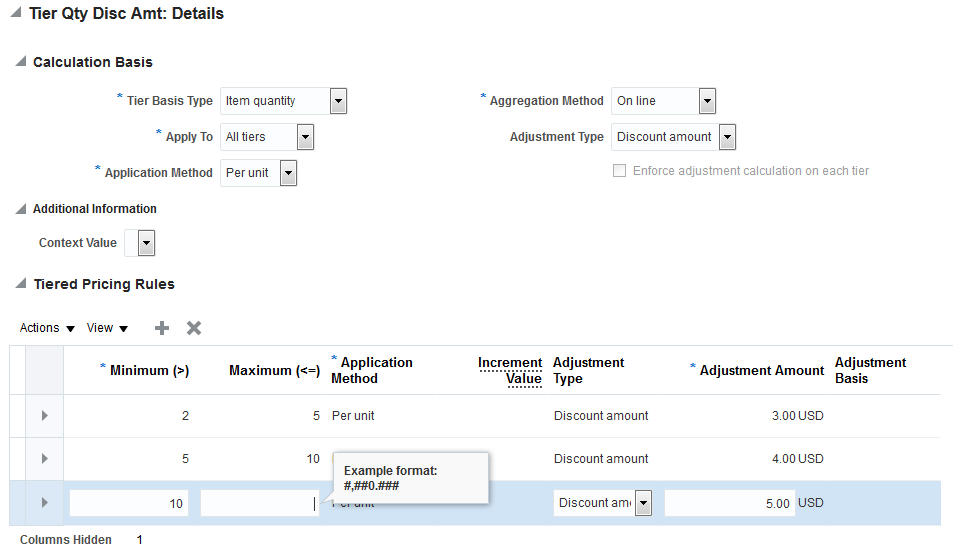
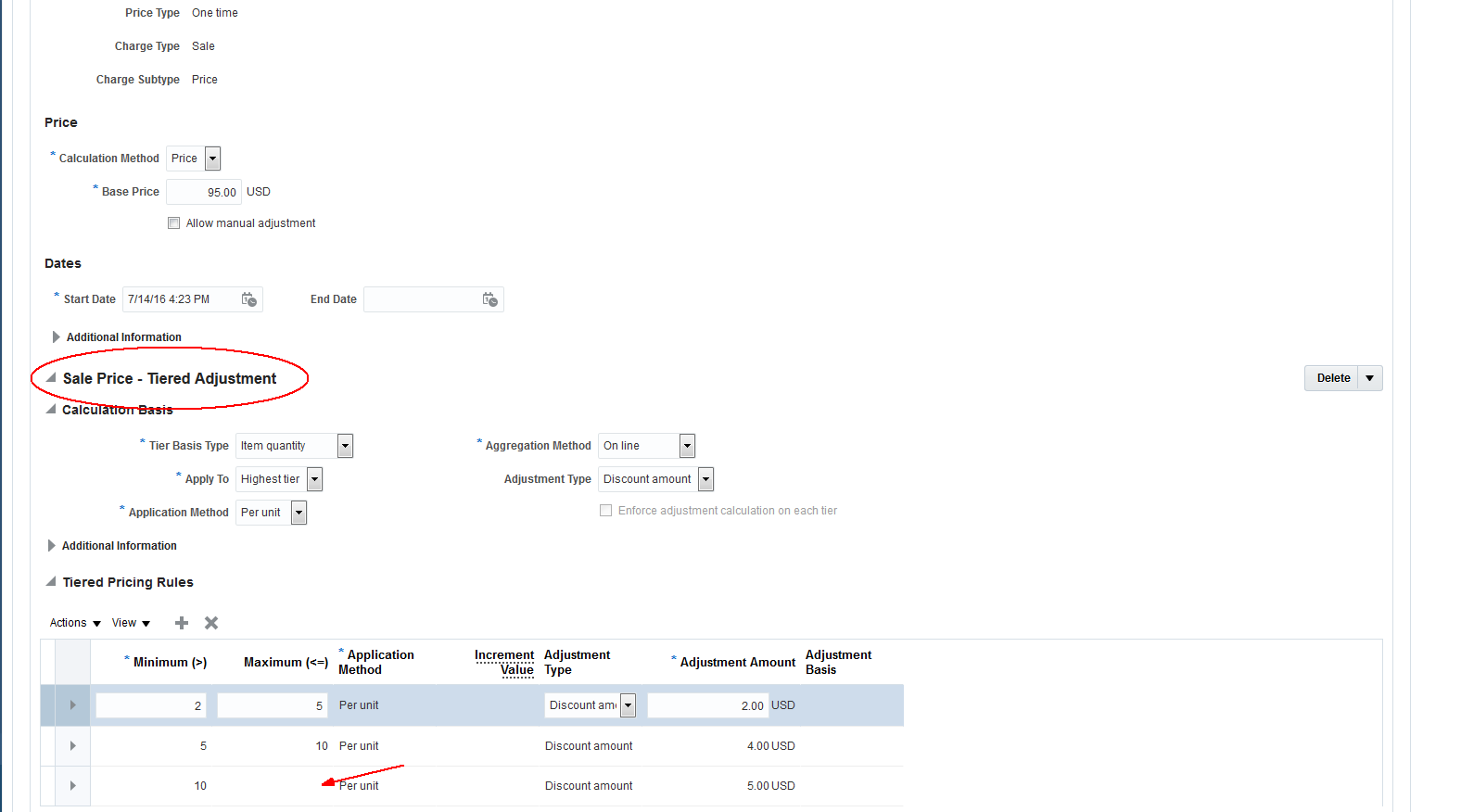
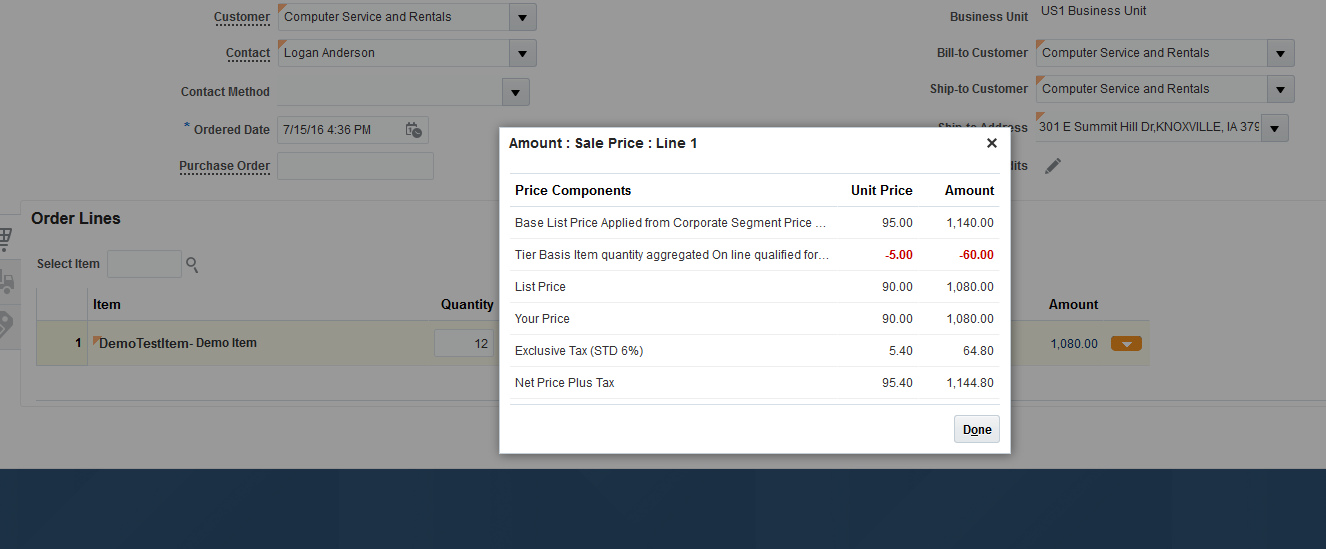
Error occurs when maximum quantity is not entered in Tier Based Discounting


Steps -

1. Login to the Application
2. Click on Pricing Administration
3. Click on side picklist and navigate Discount Lists (Assuming that the existing Discount List is connected to Strategy and other pre-reqs are done)
4. Now, search for a discount list and select an item
5. Click on Add Charge and select Tier Based Discounting
6. Create min as 2 and max as 5, application method: per unit and adjustment value as 3 USD
7. Similarly min as 5 and max as 10 ,application method: per unit and adjustment value as 4 USD
8. Min as 10 and do not give any max value (as max value is not a mandatory term here)